Authored on
Title

Subsite and Microsites

Subheader

Easy ways to create and manage smaller sites within your organization

Featured Image
small model of a tiny house set among rocks outside
Lead-in

Working with larger organizations, it’s common to want to split off a section of content into its own smaller site.

A city may want a separate site for a particular construction project, or a university may want one for a capital campaign. Marketing teams often need smaller, dedicated sites for communication and promotion.

They’re usually not complex. Often it’s a matter of a different navigation, some different branding, and a unique URL. But they still need to be designed, built, hosted, and managed — somewhere. And they’re usually needed quickly (like, now).

Whether you’re launching your first or looking for a better way to manage the ones you have, let’s explore these “mini-websites” and the best options for your organization.

Sections
Defining What You Need

I made the term “mini-website” up, but the point isn’t what you call these. It’s about understanding the purpose of each one, what makes it different from your primary website, and how you want to manage it.

Explore the “whys”

Someone at your organization is asking for another small website. Before you start the project, explore the “why.” What need would it fill that your main website can’t?

Sometimes it’s about the limitations of your current CMS rather than unique content. That’s still a valid reason — maybe your editors can spin up a small site in Wix or Squarespace faster than they can wrestle with an outdated system. Or they want an online survey or registration form that can’t easily be built on your current site.

Other times, it’s about wanting something genuinely different from the main site:

  • A unique logo — distinct from your main organization's website
  • A different primary navigation — focused on this content, not the broader site
  • Unique design — different colors, fonts, and graphic elements
  • A separate domain or subdomain — its own web address, not a path off your main site

Once you’ve defined what you need and why your current setup can’t deliver it, the next step is choosing your solution.

Subsite or microsite?

Knowing how these terms are used will help you define your approach and give you shared vocabulary with the partners building your site.

Subsites

A subsite is a unique section of an existing website. It doesn’t require its own installation or separate code, but it may have some design elements or a navigation distinct from the rest of the site. Subsites live at a “domain/slash” URL, so they don’t need their own domain or subdomain. For example, city.gov/artfair could be a subsite dedicated to an annual art fair the city hosts.

Subsites are the easiest to manage, since they build off your existing website. The tradeoff: you’re limited to whatever your current CMS can do.

Microsites

A microsite is similar, but with one key difference — it has its own domain or subdomain and lives outside your primary website’s installation. For example, parks.city.gov could be a microsite dedicated to a city’s park system, with its own branding and code base, managed separately from the main site.

Microsites are common in marketing campaigns for dedicated events or products, and for tightly defined content an organization wants to keep separate from the broader focus of its main URL.

Microsite Solutions

The good news: there are many ways to build a microsite. The hard part is deciding which one is right for you. Each option has its pros and cons — but let’s assume the shared goal is a site that meets your needs, is easy for editors to manage, and doesn’t cost a lot.

1. Use a SaaS product

One easy option is a software-as-a-service (SaaS) product like Wix or Google Sites. Anyone can create pages and forms and manage content and media without much training, and the ongoing cost is relatively small.

Someone will have to manage it, though, and the cons add up:

  • Access lives outside your systems — logins and passwords sit apart from any secure system your organization has set up
  • You’ll manage the domain yourself — someone has to buy a unique domain and configure it to the third-party service
  • It stays separate — however it grows, it will always live apart from your main site
  • Analytics are tracked separately — you won’t see this traffic alongside your main site’s
  • Editing works differently — the process won't match your primary CMS

Add a second or third microsite, and it starts to feel burdensome — your team has to remember where each one lives and how to update it.

2. Use your existing CMS

Another option, and one we know well at Electric Citizen, is to build a microsite inside your existing CMS.

With a CMS like Drupal, we can create microsites with their own navigation, logo, styles, and a unique domain — all within the same install used to manage the primary website. We can do this a few ways, from the Domain module to custom code. The benefits are real:

  • Only one CMS to manage — a single system to update and keep secure
  • Familiar tools and access — the same logins, permissions, and editing tools across all your sites
  • Granular roles — site admins who can reach all content, plus roles scoped just to the microsite

The only con is a higher upfront cost than a SaaS product. Over the long run, you tend to recover it. How much that matters depends on your organization.

3. Use a new CMS

Installing and managing a whole new CMS for one microsite isn’t usually the cheapest or easiest path. But there are a couple of ways it can work in your favor.

If you’ve been stuck on a legacy CMS for years, this is a low-stakes way to try something more modern. You might find something you like enough to eventually move your main site too.

A classic option is WordPress.com, where installation and hosting come bundled. I’d also give Drupal CMS a look. If you’re not familiar, it’s a newer alternative to “core” Drupal that works more like a plug-and-play option — preconfigured for quick, easy editing by anyone with a browser, with powerful new tools for managing media, page layout, and AI.

4. Use a URL redirect instead

If the whole point is simply a unique URL — something branded, topical, or just shorter and snappier than a full .gov or .edu domain — you may not need a separate microsite at all.

Just build the content in your existing CMS and use a redirect to send users from “snappy.url” to “www.longcityname.state.us/gov/campaign.” This isn’t done in your CMS but in your domain management. Have a developer or someone in IT with domain access set up the redirect. Easy to do, and no extra lift for you.

In Practice: City of Santa Barbara
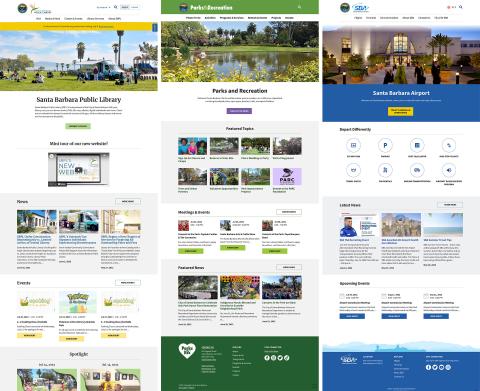
subsites of city website

We built distinct, branded microsites for departments like Parks, the Public Library, and the Airport — each with its own navigation and identity, all running inside a single Drupal install. Each one lives on its own subdomain (e.g. flysba.santabarbaraca.gov), while the city's team manages everything from one familiar place.

Managing Microsites

Once a microsite is up and running, the question is how to manage it over the long term. If it’s just one site, and it’s not mission-critical, it can probably live within your IT or marketing department.

But the more you build, the more you need a defined, documented process. I recommend a spreadsheet to track:

  • Name and URL — what each site is and where it lives
  • Purpose — why it exists
  • Domains — which ones are used, and where they're managed
  • Monthly cost — what it takes to run and host
  • Hosting and software — where it’s hosted and what CMS it runs
  • Content owner and access — who’s responsible for content, and who can get in
  • Security owner — who keeps the software updated and secure
  • Publishing dates — start and end dates, if applicable
  • Archive plan — how you’ll manage or retire the content

Don’t make the mistake of handing all of this to one person who could one day leave, or of neglecting these sites after launch. They need the same care and updating as your main website.

Final Word

Subsite or microsite, there are plenty of ways to build and manage them. But before you build your next one, think through why you need it and weigh the pros and cons of each approach.

We’ve designed and built a number of these over the years, and I’d be happy to start a conversation about yours.

About the Author

About the author

headshot of Dan

Dan Moriarty is the co-founder, CEO and chief strategist with Electric Citizen.